
AI subscriptions have a strange way of multiplying.
You sign up for one tool because it helps with writing. A few weeks later, you add an image generator. Then you find a research tool you like. A presentation app launches an AI feature. A video platform offers a discount that looks too good to ignore.
None of those purchases seems particularly expensive at the time.
The problem becomes obvious only when you look at the total.
You may discover that you are paying every month for several tools that do almost the same thing — including one or two you have barely opened recently.
That does not mean paid AI tools are a waste of money. A good tool can easily justify its price when it saves time or helps you do work you could not otherwise do efficiently.
The question is whether each subscription is still earning its place.
Here is a practical way to find out.
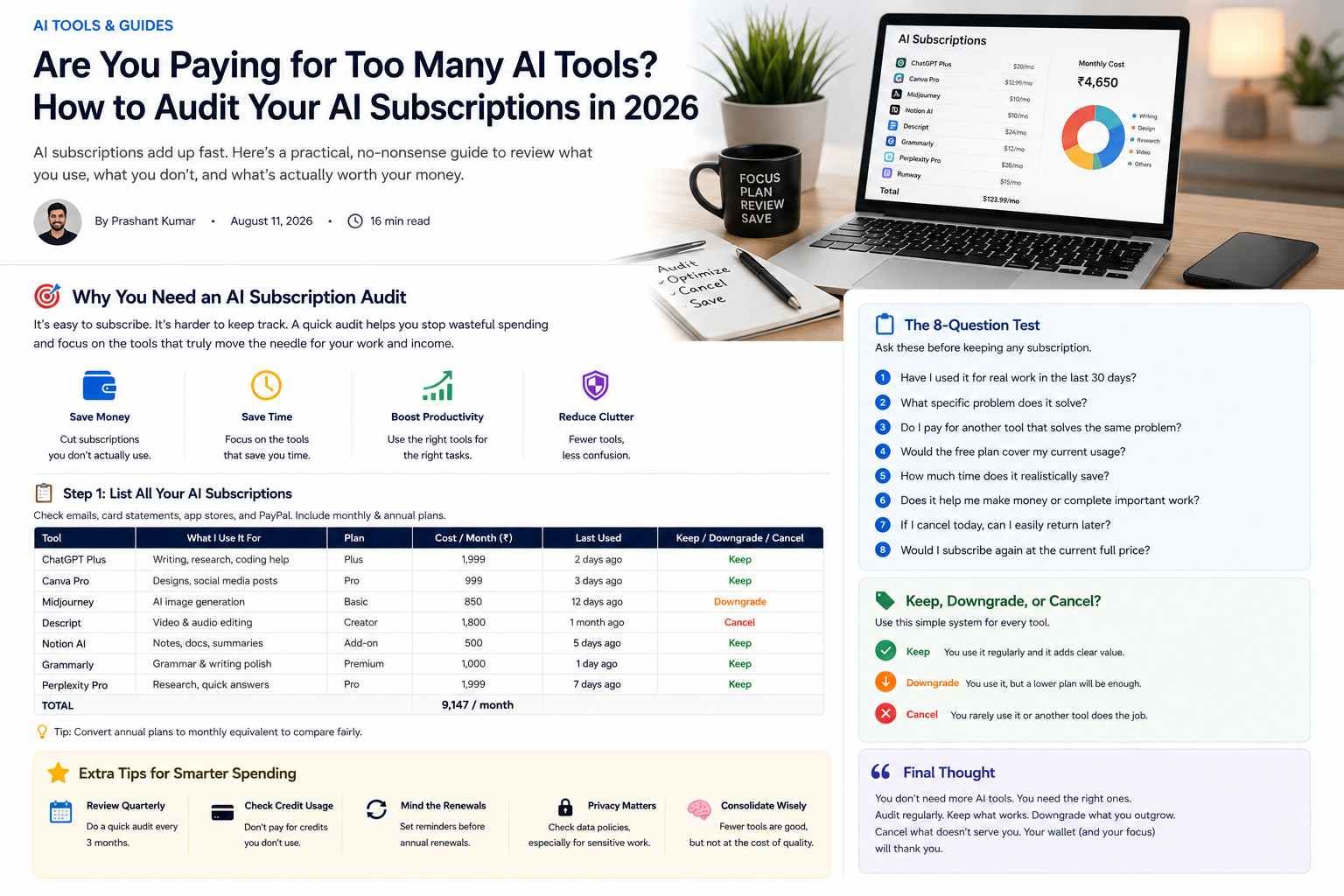
First, Find Out What You Are Actually Paying For
Do not try to build your subscription list from memory.
Most people forget at least one service, especially annual plans.
Check your email for receipts and renewal notices. Look through card or bank statements. Review subscriptions in Google Play, the App Store, PayPal, or any other payment service you regularly use.
Then write down three things for every AI-related product:
Tool name — current plan — actual cost
If it is an annual plan, divide the price by 12 as well. Seeing the monthly equivalent makes different subscriptions much easier to compare.
This exercise can be surprisingly revealing.
A ₹700 subscription does not feel particularly large. Neither does a ₹900 one. Add four or five of them together, though, and the yearly cost starts to look very different.
Ignore What the Tool Can Do for a Moment
Software companies are very good at showing you what their products can do.
That is not the same as showing you what you actually use them for.
A tool may include writing, research, image generation, file analysis, automation, integrations, voice features, collaboration, and dozens of other capabilities.
If you use it twice a month to rewrite an email, most of that feature list has no value to you.
For each subscription, finish this sentence:
“I pay for this because it helps me ______.”
Try to keep the answer to one sentence.
If you cannot explain the subscription without talking about features you rarely use, that is a warning sign.
Check Your Last 30 Days, Not Your Best Month
Some subscriptions feel essential because you remember a period when you used them heavily.
Maybe you had a big project three months ago. Perhaps you created dozens of images for a campaign or spent several weeks working on presentations.
That usage was real, but it may no longer reflect your current needs.
Look at the last 30 days.
Ask yourself:
When did I last use this tool for something important?
How many times did I use it?
Would I have noticed if I did not have access?
A specialist tool can still be worth keeping even if you use it infrequently. The point is not to cancel everything that sits idle for a week.
The point is to stop paying indefinitely for a temporary need.
The Biggest Waste Is Often Feature Overlap
This is where AI subscriptions get messy.
Many products that were once specialists are becoming general-purpose tools.
A writing assistant may now summarize documents.
A research tool may also draft articles.
A design platform may generate images.
A general AI assistant may help with writing, coding, documents, brainstorming, research, and images from the same account.
Suddenly, you are paying for three services that all handle a large part of the same workflow.
That does not automatically mean the specialist should go.
Sometimes a specialist tool really is better.
For example, if a dedicated design platform produces exactly the files you need for client work, replacing it with a more general tool just to save a small amount may be a bad trade.
But the specialist should have to prove its value.
“It’s slightly better” is not always enough.
Ask Which Tool You Would Keep If You Could Only Choose One
This is a useful test when two subscriptions overlap.
Imagine you had to cancel one today.
Which one would you miss more?
The answer usually exposes the real winner faster than comparing feature tables.
Suppose one tool has more features but you constantly have to edit its output.
Another is simpler but consistently gives you something usable in half the time.
The second tool may be far more valuable even if it looks less impressive on paper.
Your workflow matters more than the marketing page.
A Free Plan May Be All You Need Now
There is another option between keeping and cancelling:
downgrading.
Perhaps you used to need the paid plan but no longer reach its limits.
Maybe your image-generation needs have fallen from dozens of images a week to a handful a month.
Perhaps you still use a research tool, but only occasionally.
Before cancelling, check what the current free tier offers.
Products change frequently. A free plan that felt too limited last year may now cover most of what you need.
Just check what happens to your existing projects before downgrading. Some services reduce storage, history, exports, or access to previously created work when you move to a lower plan.
The Cheapest Tool Is Not Always the Cheapest Choice
Subscription audits can become too focused on cutting costs.
That is also a mistake.
Imagine a ₹1,200 monthly tool saves a freelancer four hours every month.
If those four hours can be used for paid work, the subscription may be an excellent investment.
Now imagine a ₹399 tool that is opened once every six weeks.
The cheaper tool is actually the worse deal.
The better way to think about software cost is:
What do I get back for the money?
That return might be time, revenue, better output, fewer repetitive tasks, or simply convenience.
If the return is meaningful, the subscription can be worth keeping.
Be More Careful With Tools You Use for Paid Work
Subscriptions connected to your income deserve a different standard.
If you are a freelancer, creator, developer, marketer, or business owner, do not cancel an important tool just because another option costs less.
Ask what would happen to your work.
Would projects take longer?
Would the quality drop?
Would you lose an important export format?
Would collaboration become harder?
Would you have to rebuild templates or workflows somewhere else?
There is a cost to switching too.
Sometimes keeping an established tool is more economical than spending several hours migrating to a cheaper replacement.
Annual Subscriptions Need Their Own Review
Monthly subscriptions keep reminding you that they exist.
Annual subscriptions are quieter.
You may pay once, forget about them for eleven months, and notice them again only when a renewal charge appears.
This is why annual subscriptions should be reviewed before the renewal date.
A useful habit is to set a calendar reminder a few weeks before renewal.
That gives you time to ask whether the product still deserves another year.
An annual discount is valuable only when you would have willingly paid for all twelve months anyway.
“I Might Need It Later” Is Usually a Weak Reason
People often keep subscriptions because cancelling feels permanent.
For many online AI services, it is not.
If you need the tool again six months later, you can often resubscribe in a few minutes.
So ask yourself:
If I cancel this today, how difficult would it be to get it back when I genuinely need it?
If the answer is “not difficult at all,” paying every month just in case becomes harder to justify.
This is especially true for project-based tools.
Use them when the project exists.
Stop paying when it does not.
Check Your Credits Before You Buy More Credits
Credit-based AI products deserve extra attention.
Image and video tools often look affordable until you see how many unused credits you are carrying — or how quickly advanced generations consume them.
Look at your last few billing cycles.
Are you consistently finishing the month with a large unused balance?
If so, your plan may simply be too large.
A smaller subscription plus occasional additional credits might cost less overall.
Also check whether unused credits expire. Paying for something you never use is bad enough. Paying for credits that disappear at the end of the month is worse.
Don’t Consolidate Everything Just to Have Fewer Apps
Reducing overlap is useful, but there is no prize for having the smallest possible software stack.
Sometimes two tools really are better than one.
You might use a general AI assistant for everyday work and a specialist application for design, video, coding, or another demanding task.
That can be perfectly sensible.
The goal is not:
“How can I reduce my subscriptions to one?”
It is:
“Can I explain why I am paying for every tool I keep?”
If you can, your setup is probably healthy.
Privacy Can Be a Reason to Keep Different Tools Separate
Convenience is not the only consideration.
If you work with contracts, customer information, business documents, private files, or other sensitive material, check the current privacy and data-handling policies of the tools you use.
A single platform may be able to handle all your tasks technically, but that does not automatically mean it is the right place for every type of information.
Review the provider’s current controls for data retention, training usage, deletion, business accounts, and uploaded files.
For sensitive work, those details may matter more than saving a few hundred rupees.
A Simple Keep, Downgrade, or Cancel System
You do not need a complicated spreadsheet.
Put every subscription into one of three groups.
Keep
Keep it when you use it regularly and can clearly explain what value it provides.
It saves time.
It improves important work.
It supports your income.
Or it does something that your other tools do not handle well.
Downgrade
Downgrade when you still like the tool but your current plan is bigger than your needs.
This is often the overlooked option.
You keep access without paying for capacity you rarely use.
Cancel
Cancel when the tool has become a habit rather than a necessity.
Typical signs include:
- you cannot remember the last meaningful use;
- another subscription already handles the same task;
- the free version would be enough;
- you subscribed for one temporary project;
- you keep it mainly because you may “need it someday.”
The Eight-Question Test
If you are still unsure about a particular tool, ask:
- Have I used it for real work in the last 30 days?
- What specific problem does it solve?
- Do I pay for another tool that solves the same problem?
- Would the free plan cover my current usage?
- How much time does it realistically save?
- Does it help me make money or complete important work?
- If I cancel today, can I easily return later?
- Would I subscribe again at the current full price?
That last question is particularly useful.
Forget the old discount.
Forget what you already paid.
If you discovered this product today at its current price, would you still buy it?
If the answer is no, keeping the subscription deserves a second thought.
Review Again in Three Months
An AI subscription audit is not something you do once and forget.
This market changes too quickly.
Tools add features.
Free plans change.
Prices change.
Products that once required separate subscriptions start overlapping.
Your own work changes too.
A tool that is essential during one project may be irrelevant during the next.
For most people, reviewing subscriptions every three months is frequent enough to catch waste without turning cost-cutting into another task.
Final Thoughts
There is nothing wrong with paying for several AI tools.
The problem starts when you no longer know why you are paying for them.
A good subscription should earn its place by saving time, improving work, helping you earn money, or providing a capability you genuinely need.
Keep the tools that do that.
Downgrade the ones you have outgrown.
Cancel the ones you barely notice.
And before adding another subscription, check what your existing tools can already do.
A small, deliberate set of tools will usually serve you better than a long list of subscriptions you signed up for one promotion at a time.
Sources & Verification
Last checked: August 24, 2026. Product features, availability, pricing and usage limits can change; confirm current details on each provider’s official website.
This subscription-audit framework is editorial guidance rather than a claim about every provider’s billing system. Review your own invoices and account settings, then verify plan and cancellation details directly with the provider.
Verification note: Compare plans using your real workflow and non-sensitive sample data. Check current pricing, limits, cancellation terms and privacy settings on the provider’s official website, and keep human review for important decisions and published work.
Editorial Note
AI products, pricing, credit systems, usage limits, free plans, and subscription terms change frequently. Check the provider’s official website before upgrading, downgrading, or cancelling a service.
Affiliate Disclosure
AllRounderHub may contain affiliate links. If you purchase a product or service through an eligible affiliate link, we may earn a commission at no additional cost to you. Affiliate relationships do not determine our editorial conclusions.
Continue learning: compare free vs paid AI tools, learn how to choose the right AI tool, and explore AI tools for small business.