A page builder can make WordPress dramatically easier to design.
It can also make a simple website far more complicated than it needs to be.
That is the part that often gets lost when page builders are compared.
One review focuses on the number of widgets. Another counts templates. Another declares a winner because one product has a particular animation or AI feature.
Those comparisons can be useful, but they miss the question that matters most:
Which builder fits the way you actually want to build and maintain your website?
A blogger updating one site has different priorities from an agency maintaining fifty client websites.
A business owner may want to change text and images without calling a developer.
A designer may care about detailed visual control.
A beginner may simply want to create a clean homepage without learning code.
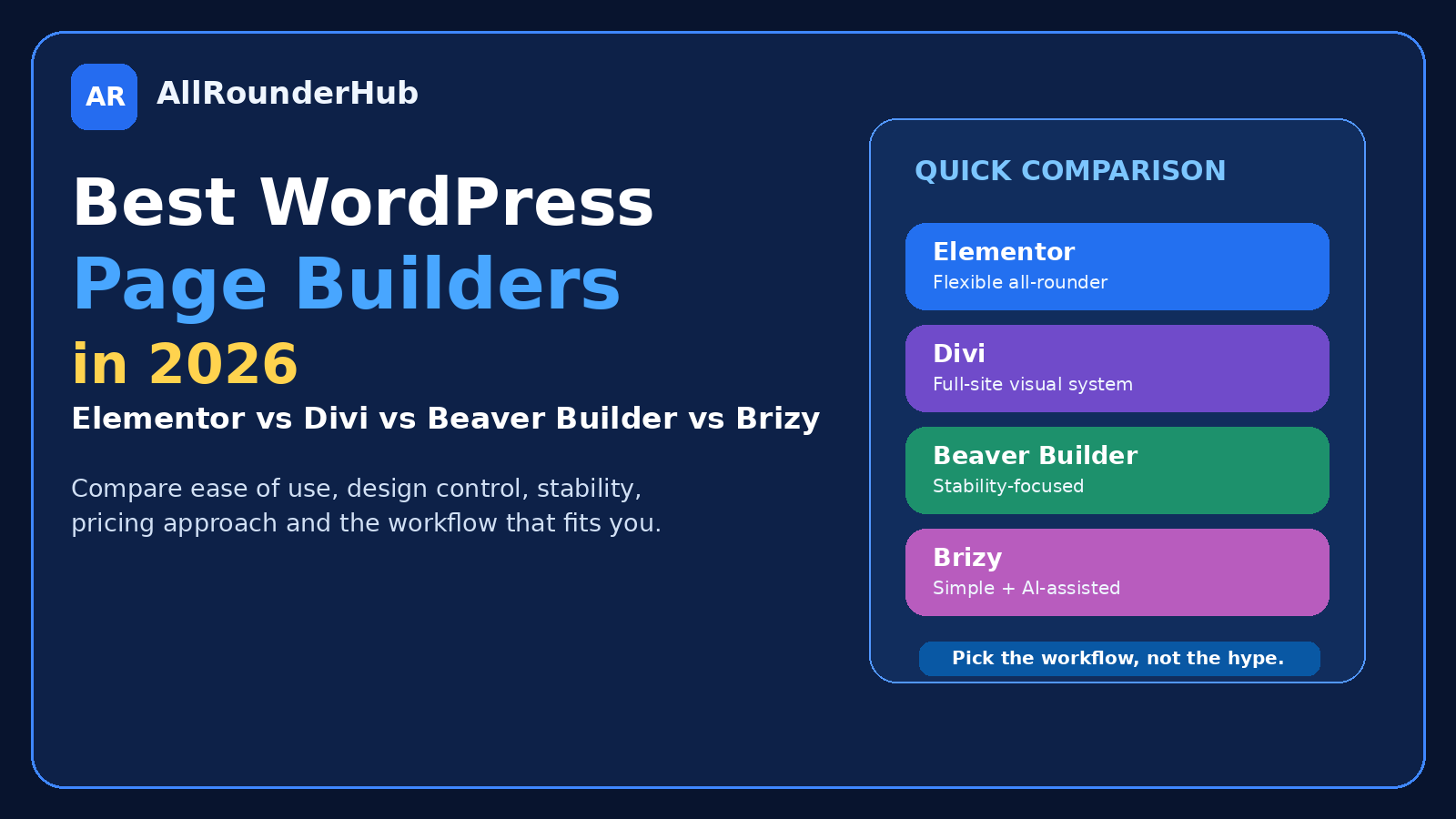
This guide compares four established WordPress page-building options — Elementor, Divi, Beaver Builder and Brizy — from that practical point of view.
There is no universal winner.
There is a better fit for different workflows.
Before Comparing Builders, Decide Whether You Need One
This sounds obvious, but it is worth asking first.
WordPress itself now provides substantial block-based editing capabilities. Depending on your theme and the type of website you are creating, you may be able to build everything you need without installing a separate page builder.
A dedicated page builder becomes more attractive when you want:
- more visual control;
- reusable layouts;
- complex landing pages;
- custom sections;
- faster no-code design;
- theme-building features;
- client-friendly editing;
- advanced responsive controls.
Do not install one simply because every website tutorial seems to use one.
Every additional design system becomes part of the website you will have to maintain.
Elementor — Best All-Rounder for Most Visual WordPress Users
Elementor is probably the easiest product in this comparison to understand.
You install it, open a page and build visually.
Its current product continues to offer a free website builder, while paid options extend the platform with additional site-building functionality. Elementor positions the builder for websites and online stores without requiring coding. citeturn597901search24
That combination is one of its biggest strengths.
A beginner can start without immediately buying a licence and learn whether the editing workflow actually feels comfortable.
You can drag elements onto a page, change spacing, adjust typography, create sections and see much of the result while you are working.
For someone coming from a traditional WordPress editor, that immediate visual feedback can make website design feel much less abstract.
Where Elementor Makes Sense
Elementor is particularly attractive when you want one visual builder that can grow with your requirements.
A simple business website may begin with basic pages.
Later, you may want more elaborate landing pages, custom templates, marketing elements or ecommerce layouts.
You do not necessarily need to change your entire design workflow as the website becomes more ambitious.
What I Like About the Approach
The free entry point matters.
It allows you to answer a very useful question before spending money:
Do I actually enjoy building pages this way?
That is better than buying a yearly licence because a demo video looked impressive.
Where I Would Be Careful
The temptation with a visual builder is to design every paragraph.
That can become a maintenance problem.
A normal article does not need thirty individually styled sections.
Use a page builder where visual layout genuinely matters — homepages, landing pages, service pages and special templates — rather than turning ordinary content publishing into a design project.
Best suited to: beginners, small businesses, marketers and users who want a broadly capable visual WordPress workflow.
Divi — Best for Users Who Want the Builder and Theme Ecosystem Together
Divi takes a somewhat different approach.
Elegant Themes positions Divi as both a WordPress theme and visual page-building framework, with full-site drag-and-drop editing covering areas such as pages, headers and footers. citeturn809756search1
That makes it attractive to users who want a more unified design ecosystem.
Instead of thinking only:
“How do I design this page?”
you can think about the website as a larger visual system.
For someone building an entire site from scratch, that can be appealing.
The Biggest Divi Advantage Is Consistency
If you like the Divi workflow, you can use the same design environment across large portions of the site.
That can make it easier to create a consistent visual identity.
Buttons.
Spacing.
Sections.
Headers.
Footers.
Landing pages.
Everything can feel as though it belongs to the same system.
Divi Is Particularly Interesting for Multi-Site Work
Elegant Themes currently sells Divi with unlimited website usage in its main membership offering, which can make the economics different for freelancers and agencies compared with products licensed primarily by individual site counts. citeturn809756search21
That does not automatically make Divi cheaper for everyone.
A person managing one small website should not choose software based on how useful unlimited-site licensing would be to an agency.
But for someone repeatedly building WordPress websites, it becomes a meaningful consideration.
Where I Would Be Careful
Do not choose Divi simply because it contains a huge design system.
Make sure you actually like that system.
A website builder is something you may work inside for years.
The editing experience matters more than how impressive the feature page looks during purchase.
Best suited to: users wanting an integrated visual design ecosystem, freelancers and people building multiple sites.
Beaver Builder — Best for People Who Value Predictability
Beaver Builder does not always appear in the loudest page-builder discussions.
That may actually help explain its appeal.
The company emphasizes stable updates, clean code and predictable behaviour, and specifically positions the product toward professionals, freelancers and agencies maintaining websites over time. citeturn809756search2
That is a slightly different sales pitch from:
“Look how many effects you can add to a button.”
And for many professional users, it is a sensible one.
When you maintain client sites, exciting features are useful.
Updates that do not create unexpected work are even more useful.
Why Stability Can Be a Feature
Imagine maintaining thirty websites.
A major builder update arrives.
If every website needs checking because layouts might unexpectedly change, the update itself creates a business cost.
This is why agencies may evaluate a builder differently from an individual site owner.
They care about:
- predictable updates;
- maintainability;
- reusable workflows;
- responsive controls;
- client handoff;
- site management.
Beaver Builder currently supports responsive layouts and allows additional fine-tuning for different screen sizes. citeturn809756search26
Is It the Most Exciting Choice?
That depends on what you mean by exciting.
If your priority is collecting every new visual effect immediately, another product may attract you more.
If your priority is building pages you expect to maintain for years, predictable behaviour can be more valuable than novelty.
Who Should Consider It
I would look particularly closely at Beaver Builder if I were a freelancer or agency building WordPress websites for other people.
For a beginner creating one personal site, its professional focus may be more than necessary.
Best suited to: freelancers, agencies and users who prioritize stability and maintainability.
Brizy — Best for Users Who Want a Simpler Visual Workflow With AI Options
Brizy aims to make website creation feel quick and visual.
Its current ecosystem includes drag-and-drop editing as well as AI-assisted website generation, and Brizy states that its AI functionality is available for both its cloud platform and WordPress workflow. citeturn809756search7
That makes Brizy interesting for a slightly different type of user.
Some people want granular control over every design detail.
Others primarily want to get from:
“I need a website”
to:
“I now have a usable starting point”
as quickly as possible.
AI-assisted generation can help with that second workflow.
Where Brizy Can Feel Refreshing
Blank pages can be intimidating.
You open the editor.
There is a white screen.
Now what?
Starting from generated structure, templates or existing business information can remove some of that friction.
You can then modify the result rather than designing everything from zero.
AI Should Still Be a Starting Point
I would not publish an automatically generated business site without reviewing it carefully.
Check:
- factual claims;
- contact information;
- service descriptions;
- images;
- calls to action;
- mobile layout;
- legal information.
Generation saves setup time.
It does not remove the need for editorial judgment.
Who Should Consider Brizy
Brizy deserves a look if ease of use and fast visual building matter more to you than having the largest ecosystem possible.
It can also be interesting for freelancers experimenting with faster initial site creation.
Best suited to: beginners, fast site creation, small-business projects and users attracted to AI-assisted workflows.
Elementor vs Divi: Which Is Easier to Start With?
For many beginners, Elementor has a straightforward advantage: its free version makes experimentation easy.
You can install it and learn the workflow before deciding whether you need paid functionality. Elementor officially continues to offer its free builder. citeturn597901search24
Divi is more attractive when you already know you want the larger Divi ecosystem and prefer its visual-building approach.
Neither is objectively easier for every person.
Editing interfaces are surprisingly personal.
A workflow that feels obvious to one user can feel irritating to another.
If possible, try the actual editing experience before committing.
Elementor vs Beaver Builder: Features or Predictability?
This is an interesting comparison because the products can appeal to different priorities.
Elementor is attractive when you want a broad visual-building ecosystem and an easy free starting point.
Beaver Builder emphasizes stability and professional site maintenance. citeturn809756search2
For one marketing website, Elementor may feel like the natural option.
For an agency maintaining many client websites, Beaver Builder’s focus on predictable updates may carry more weight.
The correct choice depends on what creates the bigger cost for you:
missing design features,
or maintenance surprises.
Divi vs Beaver Builder for Agencies
Divi has a particularly interesting licensing proposition because its main membership currently includes unlimited website usage. citeturn809756search21
Beaver Builder also explicitly targets agencies and freelancers and offers plans scaling to larger numbers of sites, including professional features such as white-label options at appropriate tiers. citeturn809756search2turn809756search6
For an agency, I would compare more than purchase price.
I would look at:
- how quickly designers can build;
- how easily clients can edit;
- update stability;
- reusable templates;
- white-label requirements;
- team familiarity;
- number of websites;
- support quality.
Saving a few dollars on a licence is irrelevant if the builder adds several hours to every project.
Brizy vs Elementor for Beginners
Both can reduce the amount of coding needed to create a custom-looking site.
The difference is likely to come down to workflow preference.
Elementor has a very broad WordPress presence and established visual-builder ecosystem.
Brizy puts particular emphasis on simplicity and AI-assisted site generation. citeturn809756search7
Someone who enjoys building section by section may prefer one experience.
Someone who wants AI to create the initial structure may prefer another.
Try to avoid choosing based purely on a checklist.
The editor itself is the product you will spend time using.
Which Builder Is Best for a Blog?
Possibly none.
That answer deserves more attention.
If your website is primarily a blog and your theme already produces attractive:
- article pages;
- category pages;
- header;
- footer;
- homepage;
you may not need a page builder for normal publishing.
Adding one can make simple content more complex to edit.
A page builder becomes more useful when the blog also needs highly designed:
- landing pages;
- comparison pages;
- lead-generation pages;
- custom homepages;
- campaign pages.
Do not solve a design problem that your theme has already solved.
Which Is Best for a Small Business?
For a small business, I would prioritize ease of maintenance.
The owner should be able to make ordinary changes without fearing the website.
That usually means:
- clear editing;
- sensible mobile controls;
- reusable sections;
- good documentation;
- reliable updates.
Elementor is a strong general option.
Divi can make sense if you want its complete design system.
Brizy may appeal when speed and simplicity are priorities.
Beaver Builder deserves attention when a professional is building and maintaining the site for you.
Which Is Best for an Agency?
The answer changes again.
An agency should think less about one beautiful landing page and more about the next fifty websites.
Ask:
Can the team learn it easily?
Can we reuse layouts?
Can clients edit safely?
Do updates create maintenance work?
Can we manage licences efficiently?
Can we white-label where necessary?
Is support dependable?
This is where Divi’s multi-site model and Beaver Builder’s agency focus become particularly relevant. citeturn809756search21turn809756search2
Free vs Paid Page Builders
Do not assume you need Pro on the first day.
Start free where a usable free version exists.
Build a real page.
Not a test rectangle with three buttons.
Try building:
- your homepage;
- an About page;
- a service page;
- a mobile version.
You will quickly discover what is missing.
Then read the premium feature list again.
Suddenly the decision becomes much easier because you are no longer comparing abstract features.
You know exactly which limitation you are paying to remove.
Page Builders and Website Speed
No page builder can be judged in isolation from the rest of the website.
Performance is affected by:
- hosting;
- theme;
- images;
- fonts;
- plugins;
- caching;
- third-party scripts;
- page complexity.
A beautifully optimized page builder cannot rescue a homepage containing enormous uncompressed images and fifteen tracking scripts.
Likewise, blaming the builder for every performance problem is rarely useful.
Keep layouts sensible.
Use the features you need.
Measure real pages instead of arguing from reputation alone.
Avoid Builder Lock-In Where You Can
Before choosing any page builder, think about what happens if you stop using it.
Ask:
Will the content remain understandable?
How difficult would rebuilding important pages be?
Are important business functions stored separately?
Can SEO data survive a design change?
Do not put functionality into a visual builder when it belongs in a dedicated plugin.
For example, affiliate links, redirects, SEO metadata and business data should ideally not disappear because you decide to redesign the site.
Design should be replaceable.
The business underneath it should remain intact.
Do Not Run Multiple Page Builders Without a Good Reason
Using Elementor on one page, Divi on another and a third builder somewhere else is technically possible in various situations.
That does not make it a good maintenance strategy.
Each builder adds:
- its own interface;
- styles;
- assets;
- updates;
- settings;
- learning curve.
Pick one primary design system.
Keep the website understandable.
Complexity is easy to add and surprisingly difficult to remove.
My Practical Recommendation
If you are a beginner and do not yet know exactly what you need, start by evaluating Elementor’s free workflow.
If you want a tightly integrated full-site visual design ecosystem and potentially build multiple websites, compare Divi closely.
If you manage sites professionally and stability is high on your list, look seriously at Beaver Builder.
If you want a straightforward visual builder with an AI-assisted starting point, try Brizy.
Notice that none of those recommendations says:
“This is the best builder.”
That is deliberate.
The builder should fit the user.
Not the reviewer’s favourite toolbar.
A Simple Page Builder Checklist
Before paying for any builder, ask:
- Do I actually need a separate page builder?
- Can I build my real homepage comfortably?
- Is mobile editing easy?
- Does it work well with my theme?
- Does it work with my important plugins?
- Will my team or clients understand it?
- Is the product actively maintained?
- Do I need its paid features now?
- How does licensing work for the number of sites I own?
- What happens if I stop using it?
- Is documentation and support adequate?
- Would I willingly keep using this workflow for the next three years?
That last question matters more than any widget count.
Final Verdict
Elementor, Divi, Beaver Builder and Brizy can all create professional WordPress websites.
The important difference is how they fit into the way you work.
Elementor offers a flexible general-purpose visual workflow with an accessible free entry point.
Divi offers a broad visual ecosystem and an interesting unlimited-site model.
Beaver Builder emphasizes stability and professional maintainability.
Brizy offers a simpler visual approach with AI-assisted creation options.
Do not choose based only on the prettiest demo.
Build one real page.
Try it on mobile.
Imagine maintaining it two years from now.
Then pay only when you know what the paid product is giving you.
The best page builder is the one that lets you stop thinking about the builder and get on with building the website.
Frequently Asked Questions
Which WordPress page builder is best for beginners?
Elementor is worth considering because it currently provides a free builder that lets beginners learn its visual workflow before upgrading. Brizy is another option for users interested in a straightforward visual and AI-assisted approach. citeturn597901search24turn809756search7
Is Elementor free?
Yes. Elementor currently offers a free website builder, with paid products available for users who need additional functionality. citeturn597901search24
Is Divi a theme or page builder?
Divi operates as a WordPress theme and visual website-building framework, with visual editing that can cover different parts of a site. citeturn809756search1
Is Beaver Builder good for agencies?
Beaver Builder explicitly positions its product toward freelancers and agencies, emphasizing stable updates and professional site management. citeturn809756search2
Does Brizy have AI website building?
Yes. Brizy currently offers AI website generation and states that its AI tools are available for both Brizy Cloud and WordPress. citeturn809756search7
Do I need a page builder for WordPress?
Not necessarily. If your theme and WordPress’s existing editing tools handle your desired layout, adding another page builder may not provide enough benefit to justify the added complexity.
Editorial Note
Page-builder features, licences, pricing and plan structures change over time. Check each provider’s current official website before purchasing.
Affiliate Disclosure
AllRounderHub may contain affiliate links. If you purchase a product or service through an eligible affiliate link, we may earn a commission at no additional cost to you. Affiliate relationships do not determine our editorial conclusions.
Leave a comment