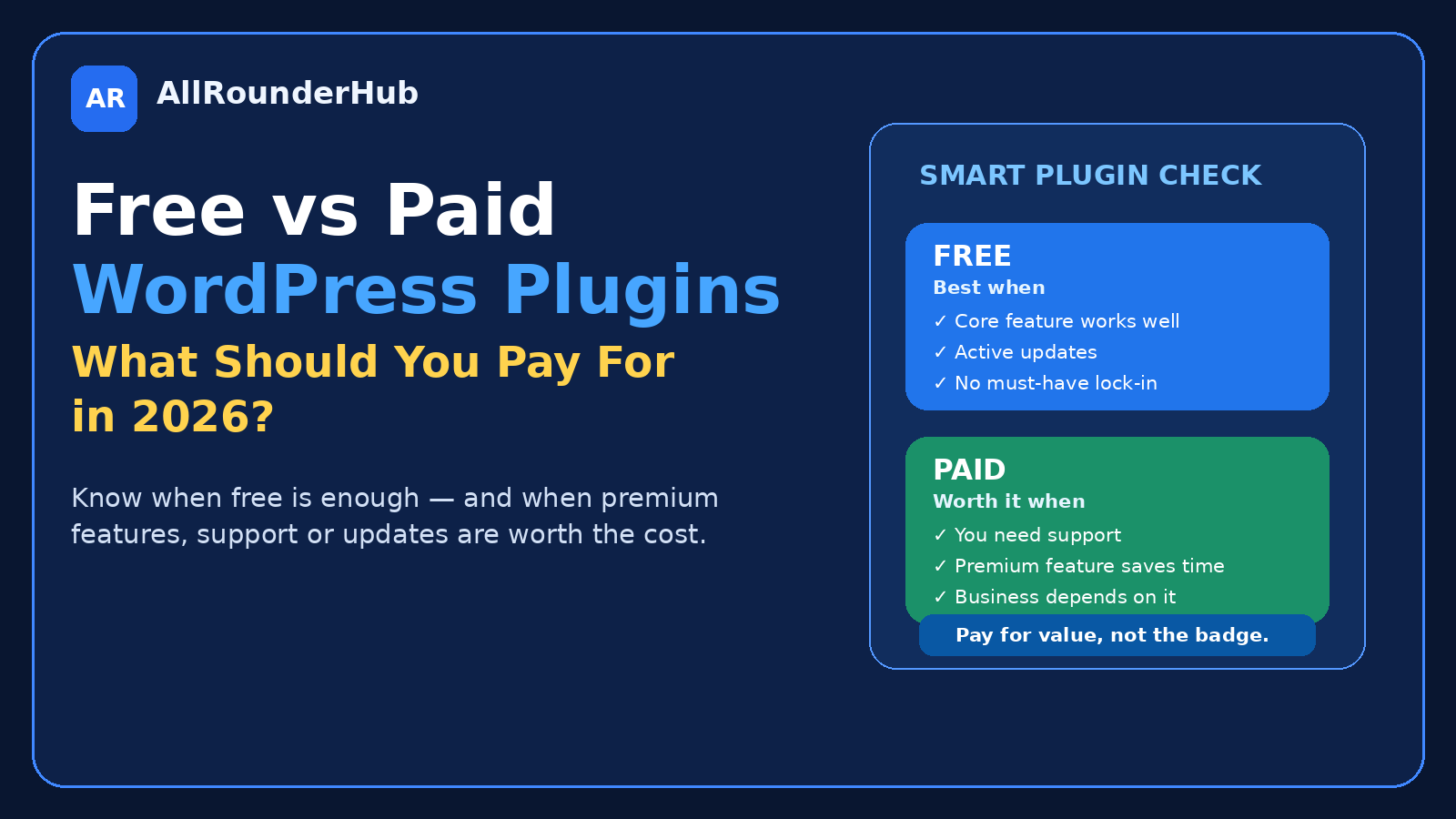
WordPress plugins are dangerously easy to collect.
You need a contact form, so you install one.
Then SEO.
Security.
Caching.
Backups.
Image optimization.
Social sharing.
Affiliate links.
Analytics.
Before long, a website that started with a handful of plugins can have dozens of them — and several premium renewal notices arriving throughout the year.
That does not mean paid WordPress plugins are a bad investment.
A good premium plugin can save hours of work, replace custom development, provide reliable support, or add a feature that directly helps a business make money.
The mistake is assuming that paid automatically means better.
In many cases, a well-maintained free plugin is all a website needs.
The real question is not:
“Should I use free or premium plugins?”
It is:
“Which features are important enough that paying for them makes sense?”
That is the question this guide will help you answer.
Free WordPress Plugins Are Not Just Trial Versions
There is a common assumption that free WordPress plugins exist only to push users toward a paid version.
Some do operate that way.
Many do not.
WordPress.org maintains an official directory specifically for free and open-source WordPress plugins, including tools covering everything from performance and security to forms, ecommerce and accessibility. citeturn663576search0
A free plugin can be perfectly suitable when it solves the complete problem you installed it for.
Suppose you only need a basic contact form.
If the free plugin creates the form, sends the message reliably, works with your theme and receives regular updates, what exactly would you be paying to improve?
If the answer is “nothing I currently need,” stay free.
The Best Plugin Is Often the One You Barely Notice
A plugin should quietly do its job.
You should not have to think about it every day.
If your caching plugin works, pages load properly and you are not constantly troubleshooting it, that is a good result.
If your form plugin sends messages reliably, good.
If your backup system creates recoverable backups without requiring constant attention, good.
Software does not become more valuable simply because its dashboard contains more switches.
For most website owners, reliability is more useful than feature count.
When a Free Plugin Is Usually Enough
A free plugin is often the sensible choice when you need one straightforward function.
Examples might include:
- a simple contact form;
- basic redirects;
- straightforward social sharing;
- basic image optimization;
- a small table of contents;
- simple analytics integration;
- basic spam protection;
- uncomplicated content blocks.
The important word is basic.
If the feature is not critical to revenue and the free plugin handles it reliably, there may be little reason to upgrade.
You can always pay later.
Do Not Upgrade Just Because the Dashboard Keeps Asking
Many plugins display upgrade banners.
“Unlock Pro.”
“Get Premium.”
“50% off today.”
“Upgrade now.”
That is normal software marketing.
It does not mean your website has a problem.
Before clicking Upgrade, ask:
Which exact feature am I trying to unlock?
If you cannot name it, close the offer.
A discount does not turn an unnecessary feature into a necessary one.
When Premium Starts Making Sense
There are several situations where paying becomes much easier to justify.
1. The Premium Feature Solves a Real Problem
This is the strongest reason to upgrade.
Imagine the free form plugin works well, but your business now needs:
- payment forms;
- conditional logic;
- customer uploads;
- advanced integrations;
- automated workflows.
If those features exist in the premium version and you genuinely need them, paying has a purpose.
You are not upgrading because the plugin is “better.”
You are buying a specific capability.
2. The Plugin Directly Supports Revenue
Plugins connected to money deserve a different calculation.
Suppose a premium ecommerce extension costs ₹5,000 per year but saves several hours of manual order processing each month.
That can be worthwhile.
The same applies to:
- affiliate-management tools;
- booking systems;
- membership platforms;
- ecommerce extensions;
- lead-generation tools;
- conversion features.
For revenue-related software, ask:
Will this plugin realistically save or earn more than it costs?
If yes, the price may be easy to justify.
3. Reliable Support Matters
Support is one of the least exciting premium features until something breaks.
If a decorative plugin stops working, you may simply remove it.
If the plugin responsible for bookings, checkout, membership access or important customer forms fails, the situation is different.
Premium support can be valuable when the plugin is central to the website.
You are partly paying for the software.
You may also be paying for access to someone who understands it when things go wrong.
4. Updates Matter for Long-Term Use
WordPress changes.
PHP changes.
Browsers change.
Other plugins change.
A plugin that works perfectly today can create compatibility problems later if development stops.
This is why the cheapest lifetime deal is not automatically the best value.
Before depending heavily on any plugin, look at whether it appears actively maintained.
For free plugins, the WordPress.org directory provides information such as compatibility, updates, reviews and support links that can help with evaluation. citeturn663576search0
For premium plugins, look at the developer’s update history, documentation and support reputation.
A Premium Plugin Can Sometimes Replace Several Free Plugins
This is one situation where paying can actually simplify a website.
Imagine you currently use:
- one plugin for popups;
- one for forms;
- one for landing-page elements;
- one for design blocks;
- one for custom layouts.
If one premium tool reliably replaces all five, the upgrade may reduce complexity.
But be careful.
“All-in-one” software can also become heavy, complicated and difficult to replace.
Do not consolidate just to reduce the plugin count.
Consolidate when the replacement genuinely makes the website easier to manage.
Plugin Count Is Not the Whole Story
People often ask:
“How many plugins are safe?”
There is no magic number.
Ten poorly coded plugins can create more trouble than thirty lightweight, well-maintained ones.
What matters more is what the plugins do.
Look for:
- overlapping features;
- abandoned plugins;
- unnecessary database activity;
- excessive scripts;
- security issues;
- plugins you no longer use;
- multiple tools performing the same job.
A plugin should have a clear reason for being installed.
If you cannot remember why it is there, that is worth investigating.
Delete Plugins You Do Not Use
Inactive plugins are easy to forget.
You installed one to test something.
It did not work.
You deactivated it.
Six months later, it is still sitting there.
If you know you are not going to use a plugin again, removing it usually keeps the WordPress installation cleaner.
The same applies to old themes you no longer need, while keeping an appropriate fallback theme can still be useful depending on your maintenance strategy.
The goal is not obsessive minimalism.
The goal is removing software that has no job.
Do Not Install Two Plugins for the Same Critical Function
This is where unnecessary conflicts often begin.
Two SEO plugins.
Two caching systems.
Multiple security suites.
Several redirect managers.
Multiple plugins trying to optimize the same files.
More protection is not always more protection.
Sometimes it means two systems trying to change the same thing.
Before installing a new plugin, check whether something already active performs that function.
This becomes especially important for performance, security and SEO plugins.
Free vs Paid SEO Plugins
SEO is a good example of where people can overspend.
A free SEO plugin can usually handle many foundational requirements such as:
- titles;
- meta descriptions;
- XML sitemaps;
- canonical settings;
- basic schema;
- indexing controls.
Premium versions may add additional automation, reporting, schema tools, integrations or advanced features.
Those extras can be useful.
They are not automatically necessary for every site.
If the free version correctly produces the SEO output your website requires, upgrading solely to improve a score inside the plugin may not be a good use of money.
Google does not rank a page because the website owner purchased the premium version of an SEO plugin.
The quality and accessibility of the actual website matter.
Free vs Paid Page Builders
Page builders are another area where the free-versus-paid decision depends heavily on workflow.
A free builder may be more than enough for:
- simple pages;
- basic landing pages;
- normal content layouts;
- standard design work.
Premium becomes more attractive when you need advanced site-building functions, specialized widgets, dynamic content, marketing tools or deeper design control.
Elementor, for example, continues to offer a free website builder while also operating paid products. citeturn663576search22
The right decision is not based on whether Pro exists.
It is based on whether a Pro feature solves something your current setup cannot.
Free vs Paid Security Plugins
Security is an area where fear can lead to unnecessary buying.
A security plugin is useful.
Installing every security product you can find is not.
Start with the basics:
- strong unique passwords;
- two-factor authentication where appropriate;
- current WordPress core;
- updated themes;
- updated plugins;
- reputable hosting;
- backups.
Then decide what additional security features your particular website requires.
For a small content website, the requirements can be different from an ecommerce store processing customer information.
Pay for stronger security when the risk and business impact justify it — not because a dashboard uses red warning icons.
Free vs Paid Backup Plugins
A backup plugin has one job that matters above everything else:
Can you restore the website when you need to?
Do not judge backup software only by whether it successfully says “Backup completed.”
Check:
- where backups are stored;
- how frequently they run;
- whether database and files are included;
- how restoration works;
- whether off-site storage is available;
- what happens if WordPress itself is inaccessible.
A paid backup tool can be worthwhile for a business-critical website if it makes recovery more reliable or automatic.
For a small site, a good hosting backup plus a suitable independent backup process may already be enough.
Free vs Paid Performance Plugins
Performance plugins can improve caching and optimization.
They can also cause problems when several of them are stacked together without understanding what each one changes.
Before buying a premium performance plugin, confirm the actual bottleneck.
Maybe the problem is:
- huge images;
- slow hosting;
- too many third-party scripts;
- a heavy theme;
- poorly optimized plugins.
A premium caching plugin cannot fix every performance problem.
Measure first.
Optimize second.
Pay third.
What I Would Pay For First
If I were building a new WordPress content website on a limited budget, premium plugins would not be my first expense.
I would prioritize:
- reliable hosting;
- backups;
- security basics;
- useful content;
- a clean design.
Then I would pay for plugins only when a real limitation appeared.
This avoids building a website around software subscriptions before the website has even proven that it needs them.
What I Would Not Pay For Too Early
I would be cautious about paying for:
- decorative animations;
- huge widget collections;
- premium social-sharing tools;
- complicated analytics dashboards;
- advanced popup systems;
- multiple optimization suites;
- several AI-writing plugins.
None of these is automatically useless.
The question is timing.
A website with 20 visitors does not need the same conversion stack as one with 200,000.
Buy for the website you have.
Leave a path for the website you hope to build.
The Renewal Test
Before buying any premium WordPress plugin, ask one useful question:
Would I still pay this price next year?
That changes the way you look at software.
A ₹3,000 plugin is not necessarily a ₹3,000 decision.
If you keep it for five years, it may become a ₹15,000 decision.
That can still be excellent value.
But you should know what you are committing to.
Check whether the licence:
- renews yearly;
- increases after the first year;
- covers one website or several;
- continues working if you stop renewing;
- requires an active licence for updates.
The first purchase price is only part of the cost.
Lifetime Deals Need the Same Scrutiny
Lifetime deals sound attractive because nobody likes recurring bills.
But “lifetime” is only valuable if the product remains useful and the developer remains in business.
Ask:
Would I buy this if it were not labelled lifetime?
Do I need it today?
Is the company actively maintaining it?
Will I still use this plugin several years from now?
If not, a permanent licence can still be wasted money.
A Simple Plugin Buying Checklist
Before purchasing a premium plugin, ask:
- What exact problem am I solving?
- Can a free plugin already solve it?
- Do I need this feature now?
- Does another active plugin already provide it?
- Is the plugin actively maintained?
- Is support important for this feature?
- What is the renewal price?
- Will the plugin still work if I stop renewing?
- Does it add unnecessary complexity?
- Would I willingly pay the same price again next year?
If you cannot give a clear answer to the first question, do not buy yet.
When Free Is the Better Choice
Stay free when:
- the free version completely solves the problem;
- usage limits do not affect you;
- the feature is non-critical;
- you are still testing the workflow;
- you do not need premium integrations;
- another plugin already covers the requirement.
There is nothing amateur about using free WordPress software.
The WordPress ecosystem itself is built heavily around open-source software.
When Paid Is the Better Choice
Premium can make sense when:
- the website depends on the feature;
- support matters;
- the premium feature saves meaningful time;
- it replaces custom development;
- it directly supports revenue;
- it reduces several plugins into one reliable workflow;
- the business requires advanced integrations.
The important thing is that you can explain why you are paying.
Final Verdict
Free and premium WordPress plugins are not opposing teams.
A good WordPress website will often use both.
Use free plugins when they solve the complete problem.
Pay when premium functionality provides a clear benefit you can actually use.
Do not upgrade because a dashboard keeps asking.
Do not collect plugins because they are discounted.
Do not judge a plugin by the number of features on its sales page.
The best WordPress setup is usually the one where every plugin has a clear job and every paid renewal has a clear reason.
If you can explain why each plugin exists, your website is already in a healthier position than one packed with software nobody remembers installing.
Frequently Asked Questions
Are free WordPress plugins safe?
A plugin being free does not automatically make it safe or unsafe. Check its source, maintenance history, compatibility, reviews and update activity. The official WordPress.org Plugin Directory is a useful starting point for free plugins. citeturn663576search0
Do I need premium WordPress plugins?
Not necessarily. Many websites can operate with mostly free plugins. Premium software becomes more useful when you need advanced functionality, integrations, support or business-critical features.
How many WordPress plugins are too many?
There is no universal number. Plugin quality, functionality, overlap and resource use matter more than the raw count. Remove plugins that have no clear purpose and avoid multiple plugins trying to perform the same critical function.
Will premium plugins make my website faster?
Not automatically. Performance depends on hosting, theme quality, images, scripts, plugins, caching and configuration. A premium optimization plugin may help, but it cannot compensate for every performance problem.
Should I pay for a premium SEO plugin?
Only if its paid features solve something your current SEO setup cannot handle. Buying a premium plugin by itself does not guarantee better search rankings.
Should I buy lifetime plugin licences?
Only when you already need the product and expect to use it long term. A lifetime discount does not create value if the plugin has no real job on your website.
Editorial Note
WordPress plugins, pricing, licences and features can change. Check the developer’s current official documentation and terms before purchasing or renewing a premium plugin.
Affiliate Disclosure
AllRounderHub may contain affiliate links. If you purchase a product or service through an eligible affiliate link, we may earn a commission at no additional cost to you. Affiliate relationships do not determine our editorial conclusions.
Leave a comment